
Quick Summary
An order management system is software that helps retail businesses handle every step of a sale. It collects orders from your website, store, and social media in one place. It updates inventory instantly, routes orders to the best location for shipping, and keeps customers updated on their delivery status automatically.
Table Of Contents
Introduction
For retail businesses, keeping track of sales across a website, a physical store, and social media can quickly become chaotic. You might worry about selling the same item twice or struggle to find where an order is when a customer asks. This is where a dedicated order management system becomes essential. It acts as a single, central hub that captures every sale from every channel automatically. In this blog post, we will explain exactly how this software works and why it is crucial for modern retail success.
Key Takeaways
An OMS collects sales from every channel into one dashboard.
It updates inventory instantly to prevent overselling online.
The system automatically routes orders to the cheapest shipping location.
Customers get automatic tracking updates without manual work.
It connects online orders with physical store inventory for pickups .
Why Manual Processes Fail in Retail
disconnected, you lose sight of stock. You might run out of items without knowing or oversell products already sold in your store.
Customers lose trust when orders are wrong. People now expect an order tracking system with every purchase. Manual methods also create inaccurate data. An automated order management system solves this by updating stock instantly, so your online store always shows what you actually have on hand.
Choose the Right POS System for Your Retail Business.
How an Order Management System Works Step by Step
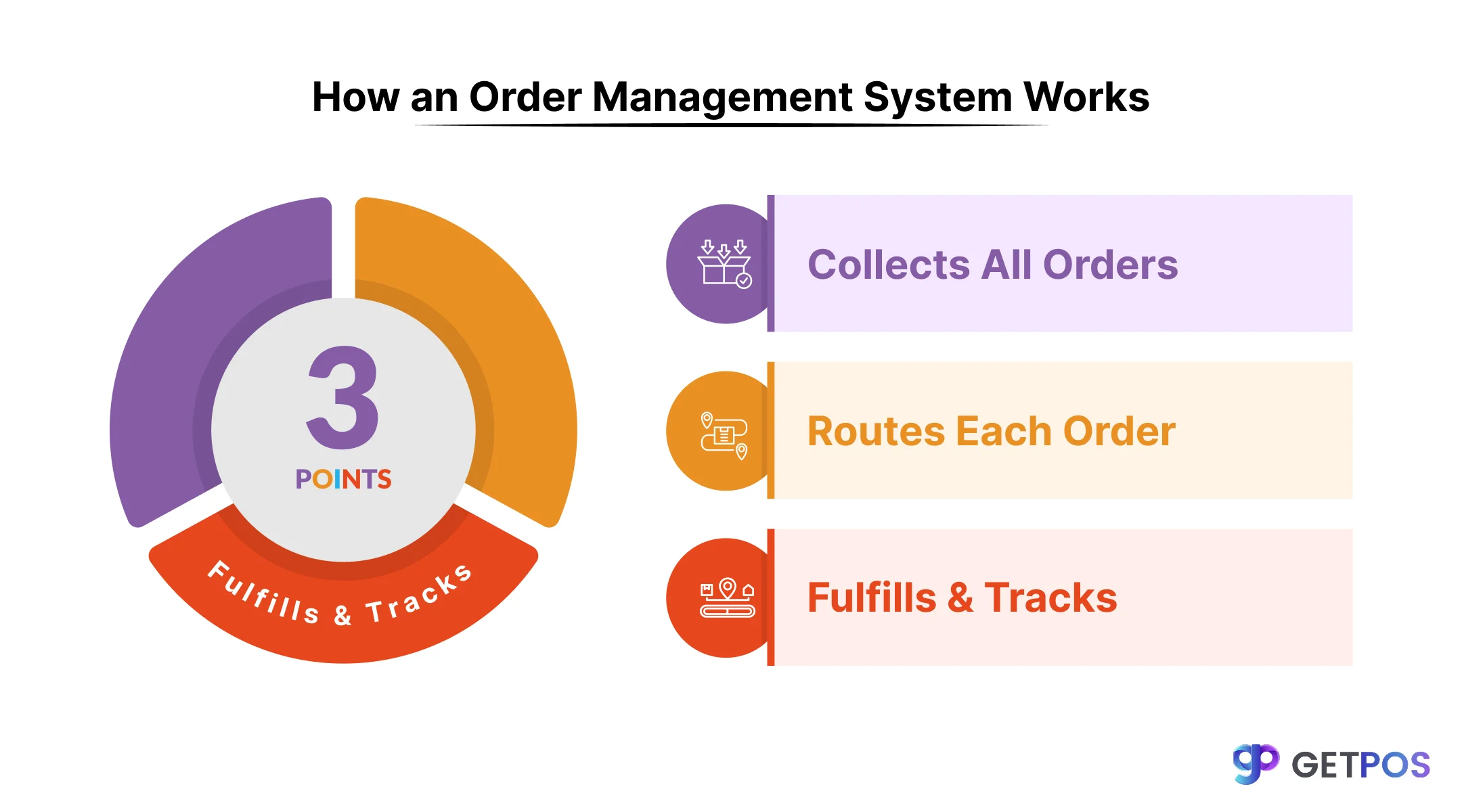
An order management system performs three main jobs to keep your retail operations running smoothly.
Step 1: It collects all orders
It collects all your sales in one place. Whether a customer buys from your website, Amazon, TikTok Shop, or through a wholesale order, the system pulls every transaction into a single dashboard. This is called multi-channel order management, and it stops you from logging into different websites just to see what sold.
Step 2: It chooses where to send the order
The system decides where each order should come from. When a sale comes in, an automated order management system looks at your rules. It might choose the store closest to the customer to save on shipping time. It might pick the warehouse with the lowest shipping cost. This part of the process is called intelligent routing, and it saves you money on every package you send.
Know more about Inventory Management Software for Restaurants.
Step 3: It fulfills and tracks the order
The system sends the order to your team. Warehouse staff or store associates get a notification to pick the items and pack them. Once the package ships, the system updates the customer automatically through an order tracking system. The buyer gets a notification without you having to send a single email yourself.
Five Features Your Order System Must Have
A good order management system includes specific tools that solve real retail problems. Here are five essential features and why they matter for your business.
Real-Time Inventory Sync
This feature updates stock levels across every sales channel instantly when a sale happens. It stops you from overselling on marketplaces and removes the need to manually check inventory counts. You always know exactly what is available to sell.
OMS Integration with POS
This connects your online store with the inventory sitting in your physical shops. It allows customers to buy online and pick up in store. It also lets stores ship online orders, which lowers shipping costs because packages travel shorter distances.
This is the Best POS System for Small Grocery Stores.
Intelligent Order Routing
This picks the best location to fulfill each order based on distance or shipping expense. It lowers what you pay for shipping and gets products to customers faster. Faster delivery keeps buyers happy and more likely to return.
Centralized Returns Management
This makes the return process simple and automated for both your team and your customers. It changes returns from a headache into a reason to shop again. You can offer instant exchanges instead of slow refunds, which keeps the sale.
Automated Reorder Points
This watches your stock levels and places new orders automatically when items run low. It prevents your best-selling products from going out of stock during busy times. It also helps you manage cash better by ordering only when needed.
Omnichannel vs. Multichannel: Why Integration Matters
There is a difference between selling on multiple channels and having those channels work together. Multichannel means you have a website and a physical store, but they operate separately. Omnichannel means these sales channels are connected and share information.
A true retail order management software makes omnichannel possible. When your systems are connected, a customer can buy something on your website and return it to your physical store. The inventory updates in both places instantly. Your store staff can see that the item was purchased online, and your website shows that the item is now back in stock after the return.
This connection gives you a complete view of your customer. You can see what they bought online and what they returned in store. Leading platforms now aim for unified commerce, where the order system, payment system, and online store all share the same core data.
Choose this POS for retailers and franchises.
Conclusion
Running a retail business today means selling across many places. Without the right system, managing these separate sales becomes messy and leads to mistakes. An order management system gives you one place to see everything. If you are ready to bring your online and offline sales together, consider using GETPOS. It connects your store sales with your online orders in one simple dashboard, so you always know what is in stock and where it needs to go.
Frequently Asked Questions
Order management covers all tasks from when an order is placed to when it is delivered. Order fulfillment is a part of it and specifically means packing and shipping the items.
The common types are standard sales orders, return orders, exchange orders, backorders, rush orders, and dropship orders. Each type needs a different handling process.
An OMS updates your inventory in real time across all sales channels. When a product sells on your website, it is instantly removed from your Amazon stock count so no one else can buy it.