
Quick Summary
Using the right pos for convenience store helps manage sales faster and track stock easily. It improves customer service and staff work, making your store run smoothly every day. This blog post shows simple ways to enhance your store with POS solutions.
Table Of Contents
Introduction
To make your convenience store experience the best possible for your customers, you need the right tools behind the counter and on the sales floor. Modern POS for convenience store solutions help you speed up checkout, track stock, and understand what shoppers really want. With the right pos system for convenience store, you can improve service in small, practical steps. This blog post explains how POS solutions and convenience store technology work together to support daily tasks, reduce errors, and grow your store.
Key Takeaways
POS speeds up checkout and reduces errors.
Inventory is tracked live to avoid stock problems.
Loyalty programs keep customers coming back.
Online and in-store sales are linked for smooth management.
Mobile POS tools help staff serve customers faster.
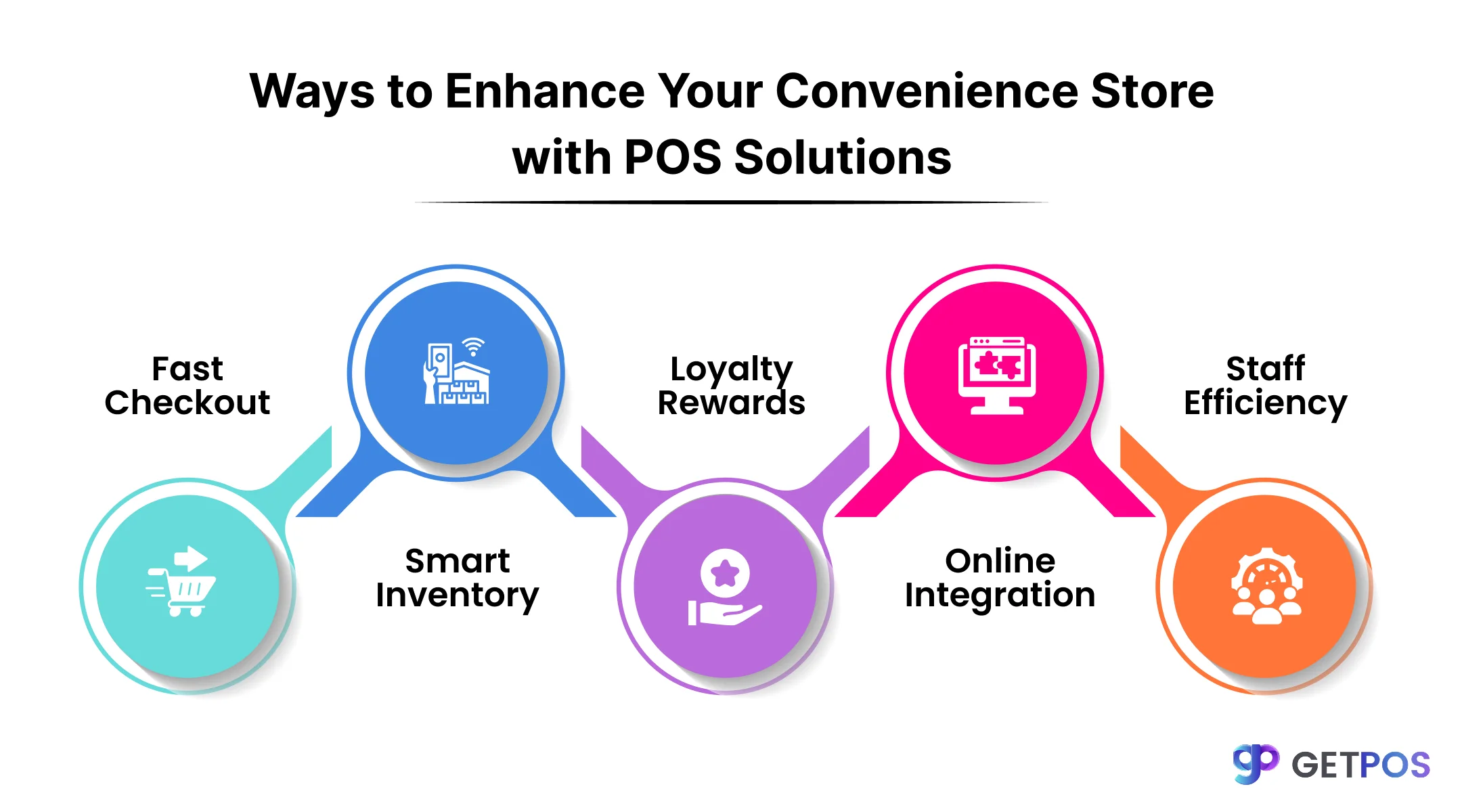
Ways to Enhance Your Convenience Store with POS Solutions
There are many ways that you can really enhance and improve your convenience store experience for your customers, and provide them with the convenience of shopping for their needs.
1. Speed Up Checkouts and Improve Accuracy
To provide a fast yet efficient checkout experience, a pos system for convenience store automates sales transactions to reduce human error and speed up the process. Features like barcode scanning help scan items quickly, lowering wait times for customers. Integrated payment options allow accepting cash, cards, and mobile payments, making the checkout smooth and easy. This reduces long queues and improves customer satisfaction.
Such automation makes managing busy times easier and ensures each sale is correctly recorded without mistakes, helping staff serve customers better with less hassle. This also saves time and avoids errors during busy hours.
This is How POS Systems Drive Sales Inventory Management.
2. Streamline Inventory Management and Stock Control
To achieve efficient stock control, pos software for convenience store offers real-time tracking of inventory levels. This helps prevent running out of items or having too many that waste space. Automated reorder features create purchase orders when stock runs low, so shelves stay filled without manual checks.
So, by using store management software, managers can update and check inventory using mobile devices. This saves time and reduces mistakes. The ability to see stock data instantly and forecast needs helps keep the store running smoothly and improves overall efficiency, saving costs and increasing sales opportunities.
Get this Stock Management Software for Better Inventory.
3. Enhance Customer Experience with Loyalty and Personalization
When your customers or repeating customers receive rewards, they feel valued and are more likely to come back. Using POS solutions, you can add loyalty programs that give points, discounts, or special offers based on purchases. These programs encourage shoppers to visit more often and spend more.
By analyzing sales and customer habits, stores can create personalized offers that fit what each customer likes. Retail technology solutions help track these patterns and send tailored promotions. This improves customer loyalty and keeps people coming back, which helps the store grow over time.
Always choose Cloud based POS systems for restaurants.
4. Integrate Online and In-Store Sales Channels Seamlessly
Most customers want the flexibility to be able to shop both online and in-store without confusion. A retail POS system connects your physical store with your online sales, giving you a clear view of all inventory in real time. This prevents the problem of selling items that are out of stock.
That’s why centralized management of sales from different channels helps you run operations smoothly and earn more by avoiding mistakes. Synchronization also speeds up order processing online while keeping your store data up to date, which improves customer satisfaction and overall efficiency.
5. Boost Operational Efficiency and Staff Productivity
Businesses can make good profits when they use time and staff in the right way. Modern convenience store technology gives workers mobile POS devices so they can serve customers anywhere in the store and manage queues better. This cuts waiting time and reduces stress on staff.
So here, strong support and clear troubleshooting steps reduce downtime when issues appear. Using reports and data from the best pos for convenience store systems helps owners see which products sell well, which hours are busy, and where processes are slow. This makes it easier to plan staff, stock, and pricing for better results.
Get POS Swap with Ease & Without the Headache.
Tips to Implement POS Solutions for Your Convenience Store
Gather and assess your needs: Identify what features your store needs, such as inventory tracking or loyalty programs. Choose a pos system for convenience stores that fits these requirements.
Prepare data and hardware: Gather product and customer data for transfer. Set up hardware like barcode scanners and receipt printers. Make sure all devices work well with the pos software for convenience store.
Train your staff: Teach employees how to use the system for sales, inventory updates, and customer service. Provide easy guides and schedule follow-ups for questions.
Test before the actual launch: Run thorough tests on the entire system, including payment processing and reporting. Fix any problems before going live.
Monitor and update: After launching, watch how the system performs using reports. Adjust settings and update software regularly to keep the retail technology solutions running smoothly.
Conclusion
Using a pos software for convenience store makes running your store easier and faster. It helps with quick checkout, real-time inventory tracking, and managing sales in one place. Staff can work better using the right tools, and you can make smart decisions by checking reports regularly. Using GETPOS can help your store save time and avoid mistakes. It offers easy-to-use software with features like automatic stock alerts and multi-store management. GETPOS supports many payment methods and keeps your store running smoothly whether you have one or many locations.
Frequently Asked Questions
It automates scanning and payment processing, reducing errors and wait times, making checkouts faster and easier for staff and customers.
Yes, it updates stock levels instantly with each sale and alerts owners when stock is low to avoid running out of products.
The common hardware includes barcode scanners, receipt printers, cash drawers, and payment terminals that work with the POS software.