
Quick Summary
Running multiple stores becomes easy with POS solutions for multi-location stores. You can track inventory across all branches, view sales reports from anywhere, and keep every location running smoothly without confusion or delays.
Table Of Contents
Introduction
Stores and businesses with multiple locations need to manage numerous business functions and operations both separately as well as combined so that every branch runs smoothly without errors. When you rely on disconnected systems or manual processes, tracking stock across different stores becomes confusing and slow. This is where the right technology makes a real difference. POS solutions for multi-location stores provide a central hub that connects all your branches in one place. In this blog post, we will explain how this unified approach simplifies daily tasks and keeps your entire retail network organized and profitable.
Key Takeaways
Centralized POS connects all your store data in one place.
Real-time inventory tracking prevents stockouts and overselling.
Cloud-based systems work even when the internet goes down.
Unified reporting helps you compare performance across locations.
Good multi-location software grows with your business needs.
The Challenges with Running Stores on Different Systems
For multilocation retail stores, if there is fragmented data and no central system, simple tasks become difficult. Managers often use different software for different stores, which creates confusion. When one location sells an item, the other store does not know about it instantly.
This leads to selling the same product twice or keeping too much extra stock. It also slows down important choices because reports take too long to prepare. A proper and right suitable POS for multi-location solves this by putting all data in one place. It gives you accurate multi-store sales tracking without any delays or manual errors.
Balancing Head Office Rules with Store-Level Needs
One of the main challenges when it comes to multi store management is to give head office full visibility while letting each location work at its own speed. If the head office controls everything strictly, local staff cannot make quick decisions during busy hours. But if stores have too much freedom, the brand becomes inconsistent.
A modern cloud-based POS system solves this problem easily. It allows the head office to set prices and view reports from anywhere. At the same time, each store can operate normally even during an internet outage. This is the real benefit of using good POS solutions for multi-location stores.
Choose this multi location POS for your business.
How Multi-Location Store Management Software Improves Daily Operations
To efficiently run your retail chain, you need more than just billing. The right software handles inventory, communication, reporting, and reliability all in one place.
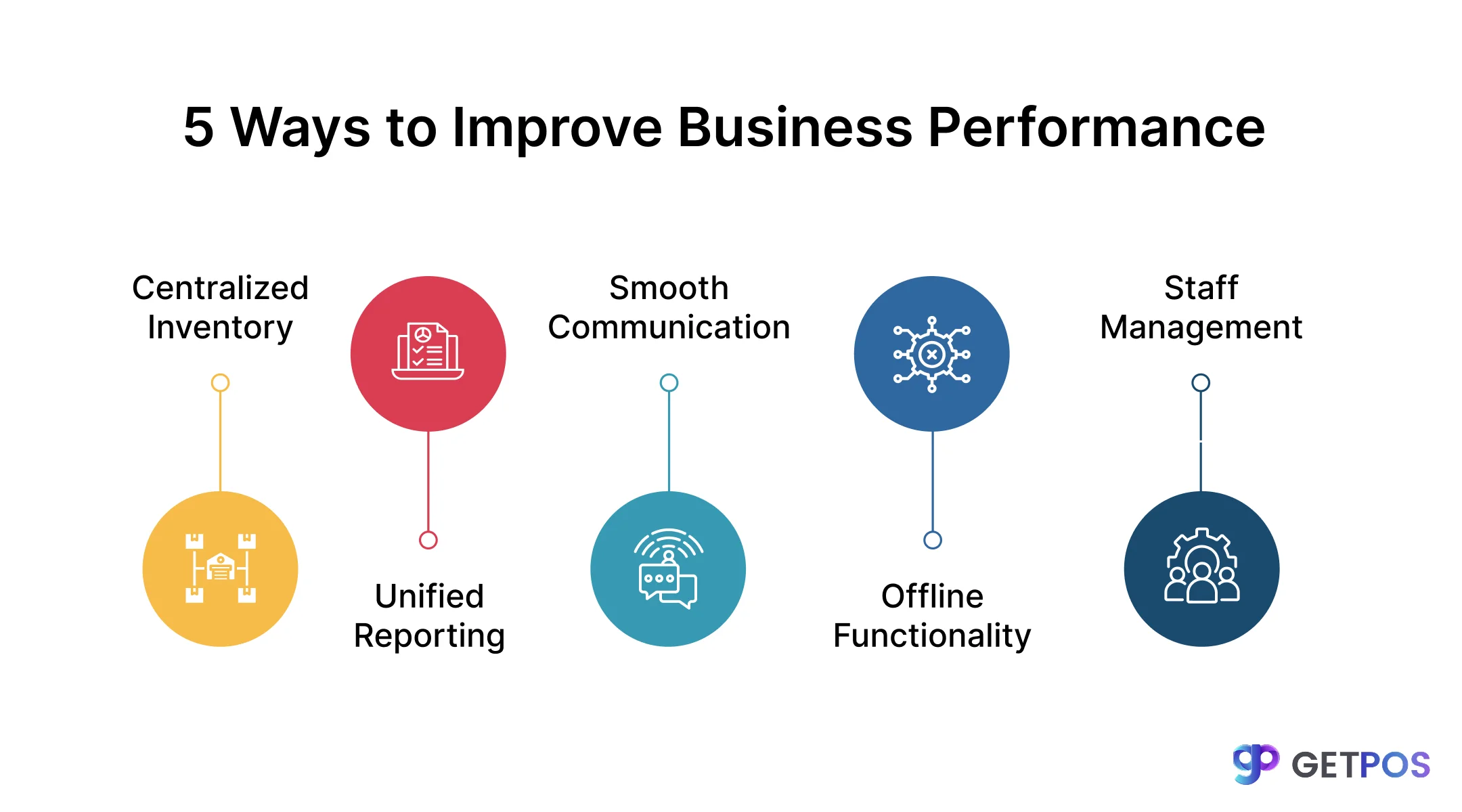
1. Keep accurate stock across all locations
Inventory mistakes cost money. When stock data is not shared, some stores run out of items while others have too many. A good multi-store inventory management system fixes this. It shows exactly what is available in every store at any time. Staff can also check real-time inventory tracking before promising a product to a customer. This prevents overselling and builds trust.
2. Simplify communication between stores and the head office
When stores use personal messaging apps to talk to the head office, important information gets lost. Orders and requests get mixed up with personal chats. A proper multi-location store management software includes built-in tools for store communication. Staff can raise tickets for repairs or send stock requests directly through the system. This keeps all conversations organized, so nothing is missed.
3. Make better decisions with clear sales reports
When you have multiple stores, you need to know which locations are performing well. Without a central system, you waste time collecting data from different places. A POS for multiple stores gives you one dashboard with all sales numbers. You can compare multi-store sales tracking data easily, which then helps you decide where to put more staff or which products to order more of.
Choose this POS for Multi-Location Retail.
4. Ensure your stores never stop working
Internet connections can fail at any time, so if your POS stops working during a power cut or network issue, you lose money. A modern cloud-based POS system keeps working even when the internet is down. It saves data locally and syncs later when the connection returns. This means your POS solutions are always available when customers are ready to buy.
5. Manage product transfers between stores smoothly
Sometimes one store has excess stock while another store needs those items urgently. Without a connected system, arranging transfers is slow and means more paperwork. A good POS system for multi-location lets you create transfer orders directly from the software. You can track when items leave one store and when they arrive at another. This makes multi-location retail management much easier and reduces stock waiting time.
Choosing a System That Grows Along with Your Business
When you choose a POS solution it should also be scalable and provide room for growth without changing the entire system. As you open more locations, the software should handle the extra load without slowing down. It must connect easily with other tools you use for accounting, marketing, multi-location business management, or staff management.
A good multi-location store management software acts as the base for all your daily tasks. It saves you from buying new systems every time you expand. This is how smart POS solutions for multi-location stores support long-term business goals.
End Note
Managing multiple store locations comes with its own set of daily challenges. A good multi-store POS system connects all your branches, gives you clear sales reports, and ensures you never lose a sale due to technical issues. It simplifies work for your staff and saves time for managers. If you are looking for a reliable partner to handle these needs, you should consider using GETPOS. It is built to help multi-location retailers run smoothly without complex setups or hidden difficulties.
Frequently Asked Questions
Yes, a good multi-location store management software shows you exactly how much stock is available at every store from a single dashboard. This helps you make quick transfer decisions.
The system generates detailed reports for every location. You can compare multi-store sales tracking data side by side to see which items are popular in specific area.
Yes, you can. The software allows head office to set global prices or give specific stores the freedom to run local promotions and discounts based on their market needs.